What a therapist needs during a session
In 45 minutes with a child, there is no time to hunt through papers. The therapist needs to know the next goal, which reinforcer works today and when the next break is due, and to record each response without looking away from the child for long.
When that information is spread across notebooks and separate tracking sheets, part of it gets written after the session from memory, and details are lost. The Enable 360 session screen keeps it all in one place.
The top bar: child and time
At the top are the child, the therapy type, the room and the therapist, plus any room activities running during the session. Next to them is a colored countdown that warns 5 minutes before the end and again at 1 minute.
The screen runs full-screen on a tablet. When time is up, everything is saved and the session closes automatically, so no session is left open without data.
Three steps that structure the session
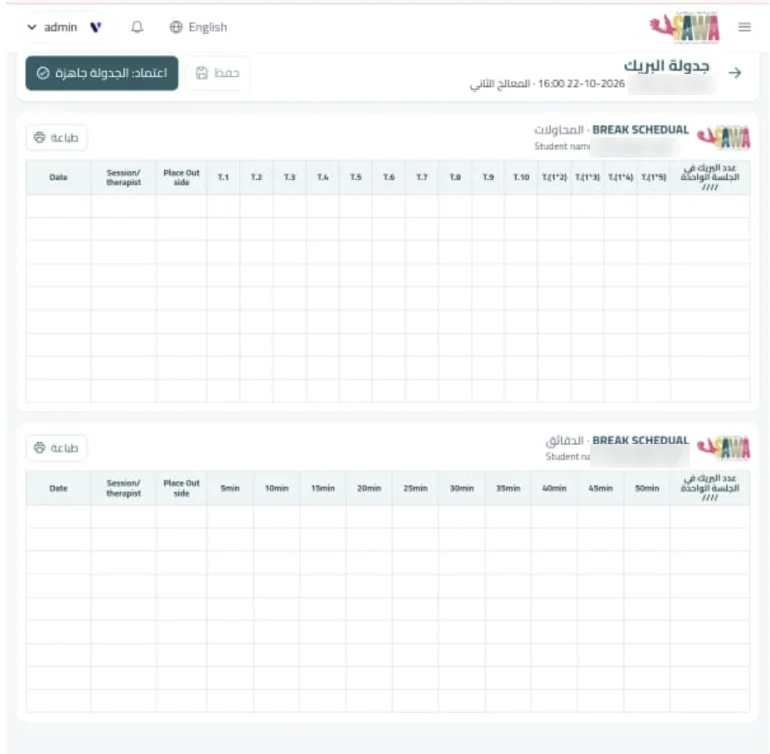
- Break schedule: prepared before the session and adjusted during it, by number of trials or minutes between breaks. Counts carry over across days, with a progress chart and printing.
- Reinforcers: the child's reinforcers and latest preference test result, so the therapist picks what fits today, or skips the step.
- Goals: goals from the child's latest approved plan, one tab per sheet, each recorded the way it is tracked.
Mastery tracked trial by trial
The system supports the tracking methods common in rehabilitation centers, each with a clear mastery rule:
| Method | How it works |
|---|---|
| Probe | Tested before teaching; a goal counts as mastered after four correct answers in a row |
| Mass trials (MT) | Three stages; mastery after three correct in a row, with prompt levels recorded |
| DTT sheets | Discrete trials per goal, with date and trainer |
| Weekly tracking | Weekly goals with yes/no and prompt level, a cumulative record by working day, and a maintenance check 5 weeks after mastery |
Every trial is saved with its date and therapist, so heads of department and clinical supervisors see each goal's progress without waiting for a monthly report.
The concepts library over the session
From inside the session the therapist opens the concepts library on top of the screen without leaving it. It opens in the child's dialect with real photos, natural voices and interactive exercises, plus an album of photos from the child's own life. See the concepts library.
The emergency button: one tap is enough
A therapist may need help right away: a severe behavior episode, an injury, a situation they cannot handle alone. In that moment there is no time to choose people or type a message.
The emergency button on the session screen works with one tap, with nothing to select or type:
- Who is alerted: the child's case manager, the clinical supervisor, the operations manager, and every staff member clocked in at the building.
- How it arrives: a red card over whatever page is open, even over other session screens, with a sound and vibration on phones. Key managers also get it on WhatsApp.
- What it shows: the child, the room, the time and who raised it.
"I'm coming": so not everyone runs
The first person to respond taps "I'm coming". Everyone else sees who is on the way, so not every therapist leaves their own child at once, and the therapist in the session sees "Coming: [name]".
After the situation
The therapist or whoever attended writes what happened, and it is saved under the "Emergencies" tab in the child's file. If management decides to inform the parents, the system suggests an editable message that goes to the parent portal, logged with who sent it and when.
Every emergency gets a full record: when it happened, who responded, what took place and what parents were told.
"My day" before and after the session
"My day" is where a therapist's day starts: today's appointments in order, each session one click away. It also lists assessments waiting for them with a "Start" button, plus search and shortcuts. Sessions not yet recorded show up under "Waiting for you" so nothing is forgotten.
Want to see this on cases like yours?
We demo the system on cases close to your center's work, starting with your needs.
Book a live demoFAQ
Does the session screen work on a tablet?
Yes. It is designed to fit without scrolling and runs full-screen on tablets and computers.
What if the session ends before the therapist saves?
Everything recorded is saved automatically and the session closes. No recorded trial is lost.
Can the center decide who receives emergency alerts?
Alerts go to the child's case manager, the clinical supervisor, the operations manager and anyone clocked in at the building. Those roles are set in the center's org structure.
Are parents told automatically when the emergency button is used?
No. Informing parents is a management decision after the situation, with a message reviewed before it is sent.
Where do session goals come from?
From the child's latest approved plan. Goals that are not approved do not appear in sessions.
Sources
Last updated: